
Important Notes for Returning Operators
2026-07-21
The ProPresenter computer has been moved downstairs, but your position has not. Going forward, you will also be responsible for triggering PVP via the stream deck. You do not need to configure PVP, that will be done for you during the week. The setup is quite simple, just push the button that corresponds to what we're doing.
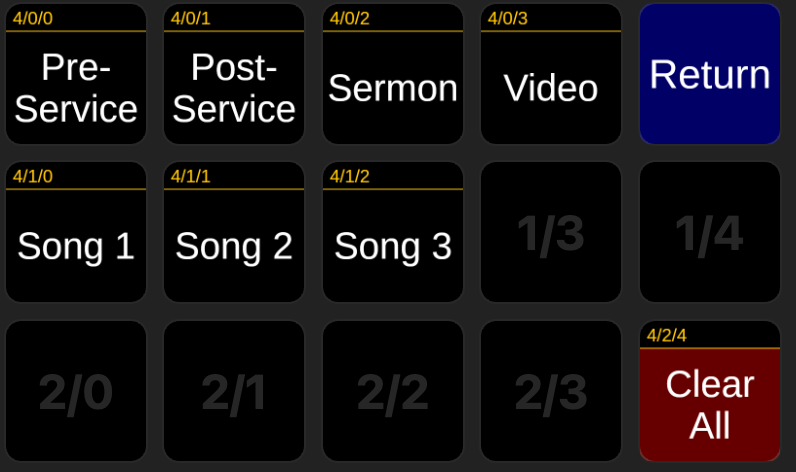
2026-06-07
I've made changes in ProPresenter and PVP to hopefully fix the lag we've been having for video announcements. Please test the video announcements without the use of the V1/V2 buttons, as it should now work directly through ProPresenter. If it is still lagging, fall back to using the V1/V2 buttons.
Additionally, I've changed how the name keys work. They're now a separate layer in ProPresenter, and triggering them has been moved to the stream deck. You'll notice that the name keys are no longer present in the playlist, don't trigger them from propresenter directly. Instead, go to the Name Keys menu in the stream deck, and trigger them from there. Each person has their own button, and there is a Clear Name button to remove the name from the stream. To go back to the main menu, press the blue Status Page button. The service producer (this week is Gan) will also have the ability to trigger these.
Technical details
If anyone cares about the technical changes made:
I've created a whole new output specifically for playing videos in-house. This output is hard wired directly to PVP, however it does not have an alpha key, which is necessary to not leave a black background within PVP. The cables are run for an alpha key, however there seems to be a software issue with the BMD Desktop Video Setup drivers, and it doesn't process the alpha key being inputted.
This means that we have two separate methods to display content on the side screens now (aside from the countdown clock and lyrics, which are also their own outputs), depending on whether we need no lag (such as for videos) or want alpha keying (like for displaying Bible verses). I've merged these together in the operator multiview by stacking the two images into the one Side Screens box, and setting the above layer to 70% alpha (since one should only ever be used at the same time, this shouldn't result in conflicts).
No comments to display
No comments to display